About This Site
AI Generation / Static HTML / Azure Deployment / Radical Transparency
This site is a static, flat HTML site. It is generated, in full, every time I run the appropriate command. In full means everything—layout, text, image placement, even the color scheme if the AI feels particularly creative that day. And since the AI agent is in charge of the layout and look, I expect it to get a little nuts every now and again. You're looking at the latest iteration: Terminal Minimalism with deep blues and vibrant cyan-magenta accents. Next build? Could be completely different. That's by design.
The whole approach is an experiment in delegation and accountability. I write notes and directives in markdown files. The AI reads those notes, interprets my intent, generates the content, designs the visual system, and outputs complete HTML pages. Sometimes it nails the voice. Sometimes it gets overly formal or tries to polish the rough edges I specifically want to keep. The point isn't perfection—it's process. Every build is a snapshot in time, timestamped and deployed with whatever worked (or didn't) at that moment.
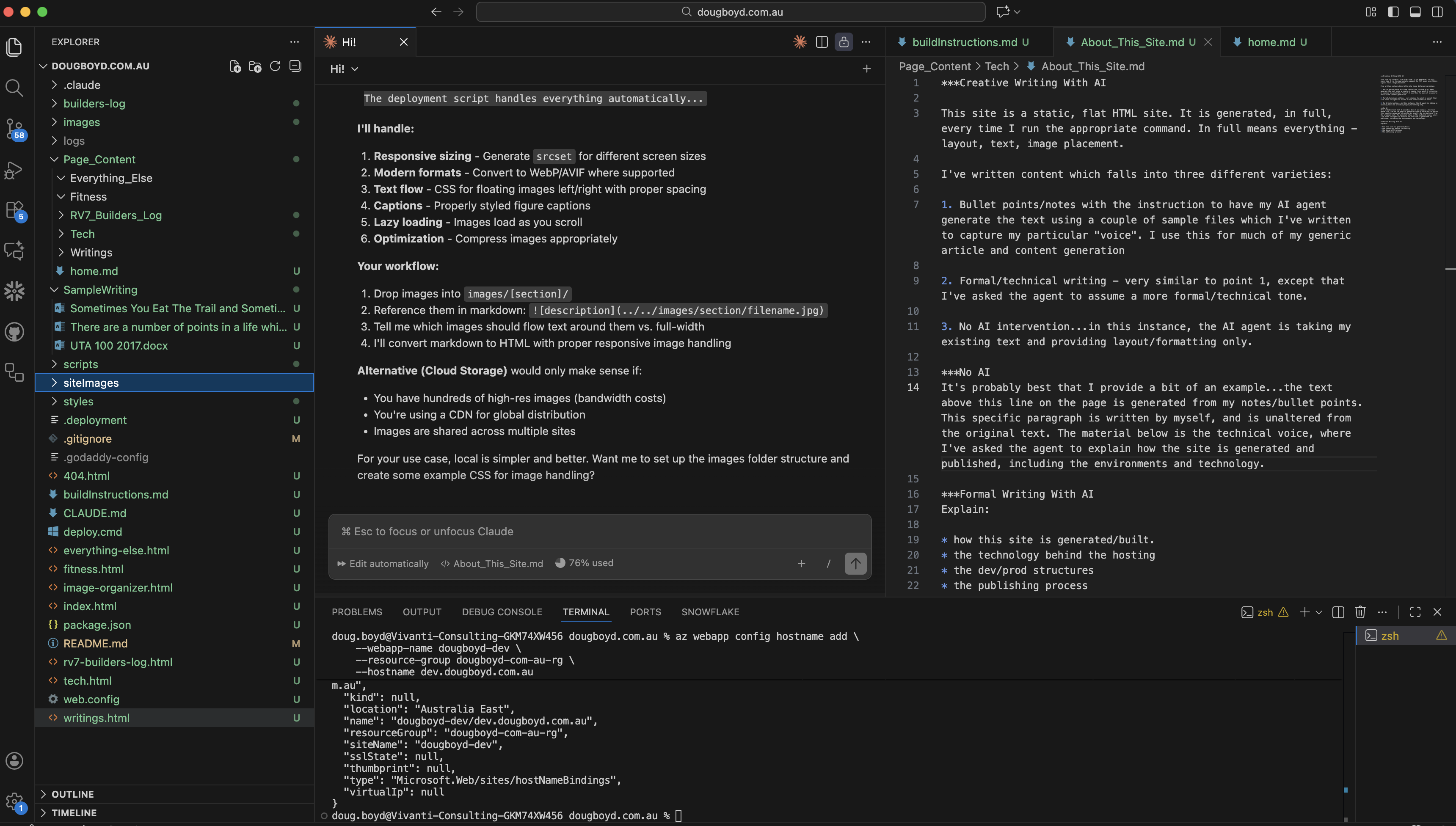
My current VS Code workspace—markdown source files, build scripts, and deployment automation
I've written content which falls into three different varieties:
- Bullet points/notes with the instruction to have my AI agent generate the text using a couple of sample files which I've written to capture my particular "voice." I use this for much of my generic article and content generation.
- Formal/technical writing - very similar to point 1, except that I've asked the agent to assume a more formal/technical tone.
- No AI intervention - in this instance, the AI agent is taking my existing text and providing layout/formatting only.
It's probably best that I provide a bit of an example...the text above this line on the page is generated from my notes/bullet points. This specific paragraph is written by myself, and is unaltered from the original text. The material below is the technical voice, where I've asked the agent to explain how the site is generated and published, including the environments and technology.
Technical Implementation
Generation and Build Process
This site is a static HTML application with no build framework, no dependency management, and no runtime compilation. The generation process occurs entirely through Claude Code, an AI agent with code execution capabilities running locally on my development machine. The agent reads markdown files from the Page_Content/ directory, processes embedded directives (Creative Writing with AI, Formal Writing with AI, No AI, Instructional), and outputs complete HTML pages with inline styling references.
Every build regenerates the entire site from scratch. This includes the CSS design system, navigation structure, content rendering, image integration, and footer elements. The AI agent maintains context about my writing voice through sample files stored in SampleWriting/, allowing it to generate content that approximates my style for sections marked with creative or formal writing directives. Sections marked "No AI" are preserved verbatim with only HTML formatting applied.
The result is a complete static artifact—no server-side processing, no JavaScript frameworks, no GraphQL layers. Just HTML, CSS, and vanilla JavaScript for navigation interactions and scroll animations.
Hosting Infrastructure
The site deploys to Azure Web Apps using a straightforward architecture designed for simplicity over complexity. Two environments exist: a development instance on Azure's F1 Free tier (accessible at dougboyd-dev.azurewebsites.net) and a production instance on the B1 Basic tier (www.dougboyd.com.au and dougboyd.com.au).
The F1 tier provides cost-free testing but lacks custom domain support and SSL certificate provisioning. Production uses the B1 tier (~$13/month) specifically to enable custom domain mapping via GoDaddy CNAME records and Azure-managed SSL certificates with SNI binding. HTTPS redirection, clean URL rewriting (removing .html extensions), custom 404 routing, security headers, and static compression are all handled via a web.config file deployed with the artifact.
Deployment Workflow
The publishing process follows a linear workflow with minimal abstraction:
- Content updates are made to markdown files in
Page_Content/ - The build command (
claude codewith appropriate prompts) triggers complete site regeneration locally - Deployment occurs via Azure CLI using zip-based artifact upload
- Build processes are disabled during deployment (
SCM_DO_BUILD_DURING_DEPLOYMENT=false) - The deployment script automatically sends email notifications to subscribers via the Buttondown API
This approach treats the repository itself as the build artifact. The entire codebase deploys as a single static asset with no runtime transformation or server-side processing. DNS configuration was handled manually through GoDaddy with CNAME records pointing to Azure Web App hostnames, plus TXT and A record verification for SSL certificate provisioning.
Email Notifications and Support
The site integrates two external services for community engagement. Buttondown (buttondown.email) handles email newsletter subscriptions, sending automated notifications to subscribers when new builds are published. The deployment script triggers this notification via Buttondown's API using a securely stored API key in the .env file.
Ko-fi (ko-fi.com/dougboyd) provides a no-fee donation mechanism for visitors who want to support the work. Ko-fi is entirely link-based with no API integration required—the button simply links to my public Ko-fi page where supporters complete transactions via PayPal or Stripe (both managed by Ko-fi's platform).
Source Code and Replication
The complete implementation is maintained in a public GitHub repository at github.com/dougboyd/dougboyd.com.au. The repository includes markdown source files, deployment scripts, build instructions, and documentation for Buttondown/Ko-fi integration. Anyone interested in replicating this approach has full access to the implementation details.
The repository demonstrates that modern static site generation doesn't require complex build pipelines, framework dependencies, or specialized tooling. Just clear content directives, capable AI agents, and straightforward deployment infrastructure. The entire stack is transparent, auditable, and reproducible.
Why This Approach
I've written this site for a handful of reasons:
First, to showcase what can be done with a simple understanding of current tools. You don't need a framework, a build system, or specialized hosting. Just markdown files, clear instructions to an AI agent, and basic Azure infrastructure. The barrier to entry for building something like this is remarkably low if you're willing to experiment and iterate. The complexity isn't in the tooling—it's in the thinking. What do you want to say? How do you want to present it? What stays, what goes, what gets regenerated?
Second, to provide a log of my current works—aircraft construction, software projects, fitness tracking, whatever I'm building at the moment. The site structure forces me to document as I go rather than retroactively polish the narrative. When you commit to regenerating the entire site with each build, you can't fake the timeline. The build log entries are timestamped. The generation dates are real. The design evolution is visible in the git history. It's an exercise in real-time documentation, not retrospective curation.
Third, and most important, to hold myself accountable. As my good mate Eamon Kenny is teaching me, accountability and personal honesty are everything. This site forces both. The build log, the fitness tracking, the project notes—they're all real, timestamped, and publicly visible. No retrospective editing, no airbrushing the failures. When you commit to documenting the process in real-time, you can't pretend the first attempt worked or that the design was obvious from the start.
It's uncomfortable sometimes, but it's honest. And that matters more than polish. The rivets that don't sit flush get documented. The parts that get damaged from using the wrong tool get photographed and explained. The builds that take longer than expected get logged with actual hours. The whole point is to capture the work as it happens—mistakes, recoveries, lessons learned, and all.
If the site helps someone else navigate a similar problem (how to prime aluminum parts, how to deploy to Azure, how to integrate AI-generated content), that's a bonus. But the primary audience is future me, looking back at what actually happened rather than what I wished had happened.